Archive for mayo 2011

Aumentar ganancias de Adsense

Desde aquella entrada en donde explico cómo ganar dinero con Adsense se me ha ocurrido ir publican más entradas sobre Adsense. El día de hoy explicaré cómo aumentar las ganancias de Adsense y así ganar más dinero:

Conceptos:

La mayoría de los usuarios de Adsense tienen un concepto equivocado de estrategias para aumentar las ganancias de Adsense, es por eso que en los siguientes puntos les marco los correctos conceptos:
1 - Más visitas no significan más ganancias: Obviamente, un blog que tiene miles de visitas va a ganar más que uno que tiene 100 visitas diarias, pero si un blog tiene 3000 visitas diarias, no significa que va a ganar menos que un blog con 10000 visitas diarias. Todo depende de varios factores:
  • Temática.
  • Ubicación de los anuncios.
  • Tamaños de los anuncios.
  • Colores de los anuncios.
  • Tipo de anuncios.
  • Keywords destacadas en el blog.
2 - Más anuncios no significan más ganancias: Si tenemos un anuncio bien optimizado, a la vista de todos los usuarios, con buenos colores, buenas Keywords y buen tamaño, podemos llegar a ganar más que si tenemos 3 anuncios con una optimización mala.
3 - Más clicks no significan más ganancias: Bueno, esto es algo que puede verse de varios puntos de vista, a lo que yo me refiero es que si tenemos 5 clicks diarios no necesariamente vamos a ganar más que si tenemos 1 click diario. La razón es que en Adsense se publicitan varios anunciantes, cada uno de ellos paga distinto que el resto, aunque obviamente sí puede darse el caso de que si se ganan más clicks se aumentan las ganancias.

Optimización de los anuncios:

Colores:

Los colores deben combinar con el sitio web que estamos tratando de aumentar las ganancias. Hay varios tipos de estrategias utilizadas en cuanto a colores, las más conocidas son:
  • Contraste: Se intenta generar un contraste entre el sitio y el anuncio, provocando mayor atención del usuario hacia el anuncio. Generalmente se utilizan distintos colores de fondo que los del sitio.
  • Complementar: Se aplican anuncios que hagan un poco de contraste con el sitio pero que no moleste mucho al visitante, el objetivo es complementar el contenido del blog y generar clicks en Adsense.
  • Implementar: Son aquellos anuncios que utilizan el mismo color de fondo que el blog, se intenta hacer que el anuncio parezca parte del sitio, y de esta manera se realicen más clicks.
Colores anuncios Aumentar ganancias de Adsense
Mis recomendaciones para los colores de los anuncios (sin importar que tipo de estrategia de paletas quieran implementar), es que coloquen el color de borde y de fondo igual. También que los títulos tengan colores más destacados que los del fondo y los enlaces, que los resúmenes tengan colores similares a los del contenido y que los enlaces tengan color similar al del título pero más claros.
Según mi experiencia, la estrategia de integración fue la que me dio mejores resultados, aunque es cuestión de probarlas todas y quedarse con una.

Ubicación:

Los grandes expertos dicen que los anuncios deben estar ubicados en la mitad superior del blog, de esta manera el anuncio podrá ser visualizado por el visitante ni bien entre al sitio. También dicen que el anuncio debe estar por encima del contenido y por debajo del título o logo del blog, de esta manera podrá ser semi-confundido por el contenido del blog y el visitante hará click, esto no está mal, lo que sí está mal es decir que los anuncios son el contenido o que hagan clicks en ellos. Recomiendo colocar anuncios en la parte superior de la barra lateral, aunque también es buena idea colocar anuncios anchos por encima de la barra lateral y el contenido.
También recomiendo guíarte por este mapa de calor, el cual indica que los anuncios más cercanos al contenido son los que generan más clicks. También indica que los anuncios de la izquierda atraen más a los visitantes. Los colores más oscuros son las mejores posiciones:
Mapa color Adsence Aumentar ganancias de Adsense

Tamaño:

Los anuncios grandes son los quedan mejores resultados. Más específicamente, los anuncios de 336x280, 300x250, 160x600, 728x90 y 728x15. Aunque según Adsense, los anuncios anchos son los que dan mejores resultados, ya que se puede leer la descripción de forma completa. Esto es un punto importante, aunque si tenemos un anuncio grande en una mala ubicación, no servirá de nada. Debemos utilizar los otros factores de optimización también.
Anuncios Adsense Aumentar ganancias de Adsense

Tipo de anuncios:

Los anuncios gráficos/texto son los más eficaces, ya que al ser combinados, tienen más contenido que asimilar con las keywords del sitio y mostrarán anuncios que al usuario le llamarán más la atención. He oído que los anuncios gráficos pagan más, aunque es sólo algo que escuché y no comprobé.
Los anuncios de enlaces son eficaces para espacios pequeños que no queremos desaprovechar, además podemos colocar todos los anuncios de enlaces que queramos, por lo cual no debemos preocuparnos.

Otros consejos:

  • Usar criterios de seguimiento en Adsense.
  • Prueba varias estrategias, cada una durante una semana o dos. Al finalizar, utiliza la estrategia que más te haya beneficiado.
  • Plantea y desarrolla buenas estrategias, no hay que apurarse en publicar los anuncios.
  • Pide recomendaciones y experiencias de amigos y compañeros, tal vez te ayude en algo saber que fue lo que le resultó a ellos.
  • Si quieres dedicar tu blog a ganar dinero con Adsense, te recomiendo contratar a un diseñador y optimizador que diseño un template que tenga espacios especialmente diseñados para anuncios Adsense.
  • Publica contenido destacado, trata de nombrar las Keywords destacadas muchas veces, así los banners de Adsense tendrán mejores anuncios y más relacionados con tu sitio y lo que tus visitas quieren.

Incoming search terms:

  • grandes ganancias con adsense
  • como aumentar pago de anuncios en adsense
  • ganancias adsense
  • ingresos adsense 3000 visitas diarias
  • hacer un click diario en adsense
  • ganancias sobre los anuncios de un blog
  • trucos para aumentar las ganancias en adsense
  • ganancias de Adsense
  • ganancias con adsense en blogger
  • ganancias con adsense

Posted in:
Tags:

Continue Reading

Trabajos Freelance, generamos empleo

Seguramente todos deben saber lo que es un trabajo freelance, para los que no saben les explico. La gente que necesita dinero y tiene algunos conocimientos sobre desarrollo web o es redactor, se ofrece en sitios de trabajos freelance para que otros usuarios de Internet (generalmente webmasters) los contraten y les paguen luego de hacer su trabajo.
Un de estos sitios es Trabajos Freelance, que es un sitio de -obviamente- trabajos freelance. Allí podemos ofrecer nuestros servicios como diseñadores, redactores, webmasters, etc. También podremos buscar gente que haga los trabajos que nosotros solicitemos.
Este sitio es muy popular, mucha gente lo utiliza y cada día va tomando nuevos usuarios que buscan dinero o personas que realicen trabajos por ellos.

Incoming search terms:

  • trabajo blogger 2011
  • trabajo como blogger 2011
  • trabajo blogger freelance
  • marquee redactores
  • blogger empleo
  • trabajo freelance
  • trabajo freelance blogger
  • empleos trabajos freelance
  • trabajos freelance
  • blogger freelance

Posted in:
Tags:

Continue Reading

El blogging como forma de ganar dinero

Dinero Adsense El blogging como forma de ganar dinero
Hoy voy a hablar de un tema muy importante, se trata de una de las formas de ver la actividad de los blogs y es el blogging como forma de ganar dinero. Seguramente habrán visto en muchos blogs anuncios publicitarios de Adsense, Smowtion Media, Infolinks y empresas similares, yo diría que eso no es dedicarse a ganar dinero, me refiero a que en muchos blogs la prioridad es darle lo mejor al lector y si se puede ganar un poco de dinero, se aprovecha la ocasión. Pero cuando vemos el blogging como una forma de ganar dinero vemos distintas posiciones en los anuncios, vemos redactores contratados y vemos muchas otras características que presentan los blogs de este tipo.
Infames: Se trata de anuncios colocados exclusivamente para todo aquel usuario que entre mediante Google. Generalmente son estos usuarios los que luego hacen clicks en los anuncios de Adsense, etc., por lo cual, se utiliza un script para que el anuncio aparezca principalmente en este tipo de visitantes. Se trata de un anuncio que se ve solo en la página y al dar dos o tres scrolls con el cursor hacia abajo, se comienzan a ver los contenidos. Esto se hace para resaltar más el anuncio y tener un CTR enorme, por lo tanto las ganancias también lo llegan a ser.
Plantillas optimizadas: Existen muchas plantillas optimizadas para colocar los anuncios de Adsense, Infolinks y relacionados. Estas plantillas destacan espacios importantes en los cuales se colocan los anuncios de Adsense. Con estas plantillas también se logran grandes ganancias y además se le da un poco de privilegio al visitante, ya que no son tan molestas como los infames.
Redactores pagos: Cuando se trata de tener un blog exclusivo para ganar dinero, uno casi nunca piensa en redactar en él, o los temas abarcados en él no son los que uno conoce. Entonces generalmente se contratan redactores para que los actualicen diaria o semanalmente.
Temáticas bien pagadas: Las temáticas abarcadas en un blog exclusivo para ganar dinero son son siempre las que uno conoce como para redactar. Generalmente se buscan las temáticas mejor pagadas en Adworks para que los anuncios de Adsense mostrados tengan buenas ganancias.
El éxito: El éxito y la popularidad de un blog exclusivo para ganar dinero no es muy importante, lo más importante es tener anuncios bien optimizados, una temática que pague bien y tener un número de visitas considerable como para ganar bastante dinero.
Así que si piensas tener un blog exclusivo para ganar dinero, yo te recomiendo que te centres en eso y que no pierdas tiempo intentando generar muchas visitas desde las redes sociales o tener muchos lectores, sino que más bien te centres en las visitas que provienen de Google y en como optimizarás los anuncios.

Incoming search terms:

  • www blogger com
  • ganar dinero redactando
  • se puede hacer dinero con blogger
  • blogger dinero
  • ganar dinero con tumblr
  • gana dinero con tumblr
  • formas de ganar dinero con blogger com
  • formas de ganar dinero con blogger
  • cuando empiezan ingresos adsense
  • plantillas blogger tema dinero

Posted in:
Tags:

Continue Reading

Nueva versión de Adsense para el celular

Adsense celular Nueva versión de Adsense para el celular
Ayer Google lanzó la nueva versión de Adsense para el celular. En esta nueva versión de Adsense podremos ver todos los datos analíticos y estadísticos de nuestra cuenta. Es una muy buena función si tenés un celular moderno y sos un editor de Google Adsense.
Para utilizar esta nueva versión de Adsense para el celular simplemente debemos acceder a http://www.google.com/adsense, como lo hacemos cuando entramos desde nuestro ordenador, allí encontrarás la nueva versión de Adsense para el celular, en la cual podrás revisar tus ganancias del día, las ganancias de ayer, las ganancias de todo el mes, los ingresos del último mes, el último pago enviado por Adsense, Las estadísticas de las ganancias de los últimos 30 días y otras opciones.
Para poder ver la nueva versión de Adsense para el celular es necesario tener activada la nueva interfaz de Adsense en nuestra cuenta, que sólo se puede activar desde un ordenador. De lo contrario se verá la fea y anticuada versión anterior.
Google ya anunció que la nueva versión de Adsense para el celular todavía está en fase Beta, y que a lo largo del tiempo se irán agregando nuevas opciones.
Más información: Dentro de Adsense

Incoming search terms:

  • adsense celular
  • version nueva blogger 2011
  • blogger en el celular
  • adsense para moviles en blogger
  • adsense para blogger 2011
  • adsense para celulares
  • ver la mas nueva vercion google para movil
  • ver blogger
  • pagina de adsense para celular
  • pagina adsense para ver en movil

Posted in:
Tags:

Continue Reading

Nuevo sistema de comentarios en Blogger

Desde ya hace mucho tiempo, Blogger introdujo la opción de comentarios en las entradas y le dió a los blogs un aspecto más de comunidad. Hoy anuncian desde Blogger Buz en español de nuevos cambios en el sistema de comentarios. Los comentarios seguirán siendo iguales y los datos para comentar sgeuirán siendo los mismos, lo único que cambia es que Blogger aplicó una nueva pestaña en el panel de control llamada Comentarios. En esta nueva pestaña tu podrás moderar los comentarios, ver la bandeja de entrada de comentarios y ver los comentarios spam del blog.
De los nuevos cambios que veremos en este nuevo sistema de comentarios podemos destacar dos grandes actualizaciones:

Filtro de comentarios spam:

Como un blog es una espacio donde tus lectores y cualquier tipo de visitantes pueden comentar, los spammers los han tomado como su nueva fuente de ataque. Muchos han habilitado la moderación de comentarios y la verificación de imagen, pero esto limita las conversaciones en tiempo real. Por eso Blogger habilitó la tecnología anti spam de Google, la cual bloquea todos los comentarios spam que Google reconozca. Los comentarios spam los podemos encontrar llendo a Comentarios > Spam:
Nuevo sistema de comentarios en Blogger 2 Nuevo sistema de comentarios en Blogger
Si en la bandeja de comentarios spam encuentras algún comentario que no lo es, simplemente debes marcar la casilla de ese comentario y pulsar el botón No es spam. Google tomará ese tipo de comentarios como comentarios que no son spam de ahora en adelante, y mejorarás la tecnología anti spam de tu blog. Puedes ver más información sobre el spam.

Bandeja de entrada de comentarios:

Blogger habilitó una bandeja de entrada en donde encontrarás todos los comentarios que hayan sido publicados en tu blog. Allí podrás borrar o marcar como spam a los nuevos comentarios. Ahora será más fácil encontrar comentarios antiguos del blog, ya que antes no se tenía la posibilidad. Todos los comentarios que marques como spam serán eliminados directamente de tu blog. También podrás eliminar un comentario y podrás borrar el contenido del comentario pero dejar el nombre del autor sin contenido y con la frase "Este comentario fue eliminado". La bandeja de entrada de comentarios la encontramos llendo a Comentarios > Publicados.
Nuevo sistema de comentarios en Blogger Nuevo sistema de comentarios en Blogger
Además también podremos moderar los comentarios del blog llendo a Comentarios > Esperando moderación.
Aviso importante: El nuevo sistema de comentarios no ha sido habilitado aún en todas las cuentas de Blogger, los cambios tardarán hasta 2 días en verse en tu blog, pero ten pasiencia, pues pronto podrás disfrutar de este maravilloso sistema.
A mi me gustó la noticia, espero que a ustedes también. Un saludo y no olvides comentar.

Incoming search terms:

  • ver comentarios en blogger
  • sistema de comentario web
  • sistema de comentarios para blogger
  • bloger nuevo
  • quitar el más informacion de la entrada blogger
  • sistema comentarios
  • sistema de comentarios blogger
  • SISTEMA DE COMENTARIOS CON MODERACION
  • sistema de comentarios divertido web
  • sistema de comentarios gratis

Posted in:
Tags:

Continue Reading

Google anuncia nueva interfaz en Blogger

La noticia ya es oficial, Google anuncia una nueva interfaz en Blogger mediante un video en el cual describen todos los grandes éxitos del 2010 y los grandes éxitos que tendrá Blogger en el 2011.
Google ha crecido enormemente con Blogger en el 2010: Han creado el diseñador de plantillas, incluyeron el filtro anti-spam en los comentairos, crearon plantillas para móviles, agregaron las estadísticas de los blogs en Blogger y agregaron las tipografías de Google.
Para el 2011 anunciaron una nueva interfaz en Blogger, que permitirá a los usuarios una forma más moderna y especial de actualizar y potenciar sus sitios en Blogger. Les dejo imágenes de algunos de los cambios:

Posted in:
Tags:

Continue Reading

Gadget de suscripción por email en Blogger

Hace unos días Blogger inauguró un gadget de suscripción por email. En otras palabras ahora podemos poner el cuadro de suscripciones al feed por email de una manera mucho más sencilla y sin errores.
Podemos ver que cuandro vamos a agregar un nuevo gadget nos encontramos con una nueva opción llamada Seguir por correo electrónico (Nuevo), que es algo así:
Feed correo electronico Blogger Gadget de suscripción por email en Blogger
Al pulsarlo genera automáticamente una dirección de FeedBurner si es que el blog no está agregado a este servicio, y podemos cambiarle el título:
Seguir por email Blogger Gadget de suscripción por email en Blogger
Y lo bueno es que el gadget ya viene configurado para adaptarse a la plantilla de colores de nuestro blog.
Gagdet rss email Blogger Gadget de suscripción por email en Blogger
Lo malo es que el gadget de suscripción por mail en Blogger viene por defecto en inlgés, entonces les voy a explicar como modificarlo:
[1] Suponiendo que el título de nuestro gadget es Follow by email, vamos a buscar en la plantilla (con los artilugios expandidos) el siguiente código:
<b:widget id='FollowByEmail1' locked='false' title='Follow by Email' type='FollowByEmail'>
<b:includable id='main'>
<b:if cond='data:title != &quot;&quot;'><h2 class='title'><data:title/></h2></b:if>
<div class='widget-content'> <div class='follow-by-email-inner'>
<form action='http://feedburner.google.com/fb/a/mailverify' expr:onsubmit='&quot;window.open(&quot;http://feedburner.google.com/fb/a/mailverify?uri=&quot; + data:feedPath + &quot;&quot;, &quot;popupwindow&quot;, &quot;scrollbars=yes,width=550,height=520&quot;); return true&quot;' method='post' target='popupwindow'>
<span>
<input class='follow-by-email-address' name='email' placeholder='Email address...' type='text'/>
</span>
<input class='follow-by-email-submit' type='submit' value='Submit'/>
<input expr:value='data:feedPath' name='uri' type='hidden'/>
<input name='loc' type='hidden' value='en_US'/>
</form>
</div>
</div>
<span class='item-control blog-admin'>
<b:include name='quickedit'/>
</span>
</b:includable>
</b:widget>
[2] Vamos a modificar la parte en verde que dice:
<input name='loc' type='hidden' value='en_US'/>
Por lo siguiente:
<input name='loc' type='hidden' value='es_ES'/>
Bueno, espero que le den una buena utilidad a esta nueva implementación de Google en su plataforma de blogging, que cada día está más fuerte y que próximamente sacará una nueva interfaz en Blogger.

Incoming search terms:

  • como poner suscripción por email
  • widget redes sociales blogger
  • email en blogger
  • nuevo gadget suscribete por email blogger
  • colocar gadget de suscripcion a blogger
  • colocar suscripcion por mail
  • gadget blogger suscriptores feed
  • como poner el gadget de suscripcion
  • gadget blogger de suscripción
  • poner submit correo blogger

Posted in:
Tags:

Continue Reading

Nuevas vistas dinámicas en Blogger

Blogger anunció ayer el lanzamiento de nuevas vistas dinámicas en Blogger. Se trata de plantillas con una interfaz muy moderna que nos permiten visualizar los contenidos de nuestro blog de una forma rápida, fácil y moderna. Esta nueva función utiliza lo último en tecnología y lenguage de programación web, tales como AJAX, HTML5 y CSS3. Son 5 nuevas plantillas que podremos agregar a nuestro blog, son las siguientes: Flipcard, Mosaic, Sidebar, Snapshot y Timeslide.
Vistas dinámicas Blogger 620x280 Nuevas vistas dinámicas en Blogger
Para poder ver una vista previa de tu blog basta con colocar luego de la dirección de tu blog lo siguiente: /view. En el caso de uno de mis blogs de pruebas, cuya dirección es http://ejemplo-perros.blogspot.com, pondríamos los siguiente: http://ejemplo-perros.blogspot.com/view.
Por ahora Blogger sólo nos proporciona estas funciones como una vista previa de lo que se viene, próximamente, cuando el lanzamiento sea totalmente oficial, podremos editar las plantillas de vistas dinámicas o inhabilitarlas, por ejemplo.
Sin duda será algo que tendrá una utilidad muy importante y que mucha gente pondrá en práctica para sus blogs.
Vía: Blogger Buz en español

Incoming search terms:

  • nuevas vistas de blogger
  • vistas blogger
  • vistas dinámicas en Blogger
  • nuevas vistas blogger
  • nuevas vista en blogger
  • nuevas de blogger
  • nuevas dinamicas
  • nuevas vista en blooger
  • nuevas vistas bloger
  • 5 nuevas vistas blogger

Posted in:
Tags:

Continue Reading

Hosting Mix, recomendaciones de hosting y más

Hosting Mix es un sitio en el cual nos enseñan precios, características y más prestaciones de los mejores y más económicos hostings. Allí podremos ver varias empresas de hosting, todas con distintos precios, planes, códigos de descuentos, espacio, velocidad, etc., de los cuales puede que encuentres algún hosting barato que te guste para alojar tus sitios.
Empresas como Hostgator, Justhost, Bluehost o HostMonster son las que encontraremos en este sitio, además de otros hostings no tan conocidos que sí tienen un buen poder administrativo, empresarial, de capacidad y de buenos precios.
En Hosting Mix nos recopilan también un listado de los 5 mejores hosting de todos, los cuales obviamente son los que todos conocemos. Yo por ejemplo, utilizo como hosting Hostgator, el cual me a salvado en muchas oportunidades y me gustó mucho, lo único malo es que está todo en inglés, pero de precio, características, prestaciones y espacio de almacenamiento no me puedo quejar para nada.

Incoming search terms:

  • recomendaciones de los mejores alojamientos web gratuitos

Posted in:

Continue Reading

Hostgator – El mejor hosting de todos

Hostgator es uno de los mejores hostings web de todos. Sus grandes servicios, así como sus excelentes servidores, hacen de Hostgator una de las empresas más populares de todas las empresas de hosting web.
En Hostgator podemos contratar diversos planes de hosting web, con diferentes precios y características, unos mejores que otros, cada uno adaptado a lo que necesitamos y a lo que podemos pagar. En Hostgator destacamos 3 planes de hosting web, el plan Hatchling, el plan Baby y el plan Business:
Planes Hostgator Hostgator   El mejor hosting de todos
Sus excelentes precios, sumados a la gran calidad y servicio de atención a los clientes, hacen de Hostgator, el mejor hosting de todos. Es el hosting web con más usuarios activos y más sitios web alojados. Este hosting web nunca se cae y tiene muchos sistemas de seguridad para proteger sus servidores y tus sitios web alojados.
En Todo Blogger actualmente tenemos contratado el plan Baby de Hostgator, ya que es muy económico y nos permite alojar varios sitios, ya que como sabrán, yo cuento con varios otros sitios web y blogs.
Desde hace tiempo, Hostgator ha lanzado una serie de cupones de descuento que nos permiten contratar el primer mes a tan sólo 0.01 dólares, uno de esos cupones es HGC25.
No esperes más, contratá tu hostin web de Hostgator ya mismo.

Incoming search terms:

  • hostgator
  • hostgator el mejor
  • plan baby de hostgator
  • uno de los mejores hosting
  • plan baby de hostgator precio
  • cambiar plan hosting hostgator
  • el mejor hosting
  • mejor que hostgator
  • que es un HostGator
  • hostgator mejor hosting para wordpress

Posted in:

Continue Reading

Simple Changes Doubled My Adsense Revenue

In this post Todd Fratzel from Home Construction Improvement and Today’s Green Construction shares how he doubled the AdSense revenue on his blog with a few simple changes.
Several simple changes in my Adsense approach and layout have almost doubled my blog’s revenue. The results were so drastic and eye opening that I convinced a friend (www.oneprojectcloser.com) to make the same changes to his blog with even better results. The changes involve two simple ideas that can be easily incorporated into any Adsense monetized website or blog.
I’ve been blogging for over two years now and growing traffic, authority and readership slow and steady. Along with the steady increase in traffic the site has continued to increase it’s Adsense revenue at a similar pace with no sudden increases regardless of all the changes and adjustments I’ve made. That was true until I took the time to study many different published Adsense approaches. As I read all of these different approaches three distinct ideas came to the forefront.

Three Important Adsense Approaches

  • Less is More – This concept is really simple yet I hadn’t really given it much thought before. First off the top ad is the highest paying ad and you want that in the best possible position.
Secondly, if you’re using all three of the allotted Adsense units on a given page then there are quite a few ads all competing for attention or a click through. However, if you only use one Adsense unit then you’re limiting the number of ads served and improving the likelihood that one of those ads will get clicked. Therefore, the theory is that an advertiser will be willing to pay a higher rate for less competition.
  • Size Matters – If you read enough Adsense guides you’ll find that the 336 x 280 Large Rectangle is the most effective Adsense unit. It typically offers four ads and they are likely to be very related to the topic based on the position between the post title and body.
  • Position, Position, Position – Placing your Adsense unit above the fold is imperative for success. This makes sense to me for one reason. Every day my site (and I assume most sites) gets a majority of it’s traffic from search engines. This traffic is generated from people searching for something. So when they land on my page and they decide that it’s not the content they were looking for then I want them to see the Adsense unit right where they land so that becomes an “outclick” option.

How I Doubled My Adsense Revenue

In order to understand the approach I used to double my Adsense revenue I’ll use two graphics that show the same post before the changes and after the changes. First – the before shot:
increase-adsense-earnings-before.jpg
And here’s the after shot:
increase-adsense-earnings-after.jpg
My Old Adsense Layout Included:
  1. 468 x 60 Text Only Unit located in the header area of my page.
  2. 468 x 60 Text Only Unit located between the post title and the body of the post.
  3. 468 x 60 Text Only Unit located at the end of the post before the comment section.
Revised Adsense Layout Includes:
  1. Remove the old 468 x 60 Text Only Unit completely and replaced with an affiliate banner. The idea here is to remove some of the units in order to address concept #1 of Less is More.
  2. Replace the old 468 x 60 Text Only Unit with the 336 x 280 large rectangle unit. This unit is above the fold between the post title and body which makes it a very prominent position. This change addresses both of concept #2 and #3 for Size Matters and Position.
  3. Remove the old 468 x 60 Text Only Unit completely. I actually replaced this with the new Chitika Jumbo unit which is also performing quite well. Again the removal helps address the Less is More concept.

Immediate Results

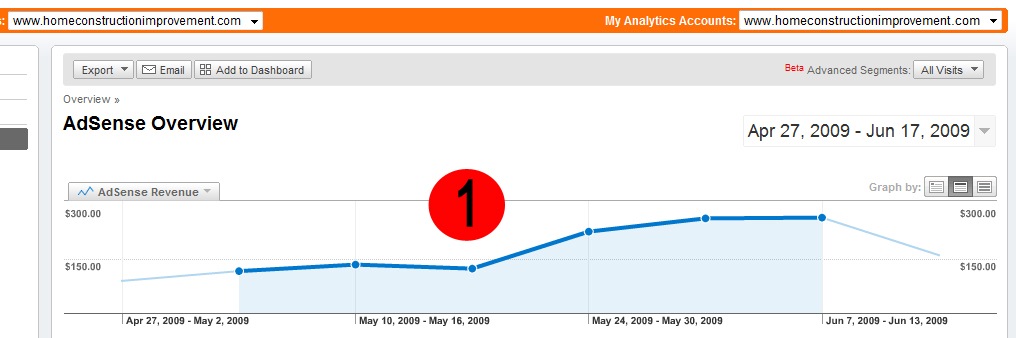
increase-adsense-earnings.jpg
If you look at the graph of my Adsense revenue over the last two months you’ll see that the increased revenue was immediate. The changes were made as indicated by the Red Circle #1. As you can see my revenue went from under $150 per week to almost $300 per week. Immediate should be taken with a grain of salt, the increase happened over several days and it’s likely to take some time for Adsense to incorporate the reduced number of ads being served on your site.

Summary Of Improved Adsense Layout

While I’d be naive to think that this will double any and all Adsense revenue for any site I think the principal is worth evaluating on all sites. The concept is really simple; make one large, well positioned ad do all the work. This will make your page look cleaner and it’s likely to improve your revenue immediately. It’s also important that you follow some of the basic suggestions of blended ads that match the color and fonts of your site. So far I’ve done this on two of my sites and a friend’s site with the same result, improved Adsense revenue.
Note from Darren: I think that the key with optimizing a blog for AdSense (or other ad networks) is to experiment. The best thing that Todd did here was to try something new and to track the results. What he’s done has worked for him but it might not work for everyone – the key is to keep trying different combinations of numbers of ads, ad sizes, ad positions, ad design (color, fonts etc) and to try different ad types until you find what works best for your blog.

Posted in:
Tags:

Continue Reading

The Parable of the Lemonade Stand: Is AdSense Costing you Money?

A guest post by Kevin from BeginnerBloggerTips.com (with some comments from me below too). Image by Shawnson.
My journey into affiliate marketing.
Before I start, I’d like to make two disclaimers:
  1. I don’t hate google or AdSense—this article isn’t a rant against either.
  2. I recognize that every blog is different—what I’m about to say may not apply to your blog. Regardless, I think you should ask yourself the question I’m presenting here.
Disclaimers finished; let’s get to the point:

The Parable of the Lemonade Stand

42549598_b0780fcbfe.jpgImagine a lemonade stand. The entrepreneurs get the ingredients, start up their business, and have dozens of customers per day. It earns twenty dollars a day. Not bad for a humble lemonade stand, right?
Now, let me throw in a twist: imagine the before-mentioned entrepreneurs are in their 30’s. They own the lot on which the lemonade stand is located. The lot is located along a major highway in a rapidly growing suburban area. All adjacent lots have businesses making thousands of dollars per day. Suddenly our lemonade stand seems rather silly.
This concept is called opportunity cost—the economic consequences of choosing one thing over another. I’m learning about this the hard way — I’ve been making pennies per click when I could have been making dollars per click.
Let me explain in a little more detail. As I’ve mentioned before, strongandfit.net is the first profitable blog I’ve ever had. As my traffic increased, so did my AdSense earnings. A few dollars a day ads up, so I was finally seeing checks come in at the end of every month (I’m new to making money online, so I’m easily amused).
But I started noticing something: a few products in particular kept showing up over and over on my blog (in the AdSense widget). “Wait a minute,” I thought to myself, “these products obviously convert well if someone is willing to spend money promoting them.” I realized I had inadvertently put myself at the bottom of the economic food chain: I was getting paid a few cents per click while someone else was earning commissions on sales produced by these clicks.
I did a little research and started directly advertising these products with affiliate marketing. So far it seems to be paying off—my blog is making more money.
But there’s another benefit: I have complete control over what gets advertised on my blog. It’s turning into a win-win situation: my readers are referred to high quality products, and I earn more in commissions.
I still use AdSense, but I’m devoting more of my prime “real estate” on my blog to affiliate marketing. Maybe you should also consider doing this.

A Note from Darren

Like Kevin says, I don’t have anything against AdSense either. In fact I find that it works quite well on some of my sites. For me the idea of ‘Opportunity Cost’ is a powerful one. For every decision you make to use ANY type ad unit on your blog (whether it is AdSense, some other ad network, an Affiliate product, an ad sold directly to an advertiser, an ad for a product of your own there is a potential opportunity cost of that decision.
The key is to test different options. Kevin has had success in substituting affiliate ads in the place of AdSense, for others affiliate products might not work, but an ad for your own product might. For others it might be about swapping ads to Chitika or another ad network. For others it could monetize better by selling ads directly. For others still it could be better to not have ads at all but to sell yourself on your blog as a consultant.
The key is to test and experiment with different models.


Continue Reading

9 Tricks I Used To Triple My AdSense Earnings In 30 Days

I have been using Google AdSense to monetize my blogs and websites for as long as I remember. In fact it was the first method I ever tried (I made a whooping $15 on my first month… back in 2005). Over the years I migrated to other methods (e.g., direct sponsors and affiliate marketing), which made AdSense become merely an inventory filler. I was still making around $1,000 monthly from it, but whenever I could I would use other methods over it.
Then some months ago I started noticing an upward trend on the CPC of my sites, and I figured that I should give AdSense another try. I started applying some tricks here and there, and the next month I made over $3,000 with it (that is combining all my sites). I was pleasantly surprised, and I decided to keep using it actively on some sites.
In this article I want to share with you the tips and tricks I used to triple my AdSense earnings in one month.

1. I added units to my Big Websites

Daily Blog Tips and Daily Writing Tips are my largest websites in terms of traffic. They are getting close to one million monthly page views (combined). Despite that I was not using AdSense on them, mainly because the direct sponsorship model was working relatively well.
Some months ago I decided to load some AdSense units on the sites, however, and the results were very positive. Around 70% of the boost I generated to my earnings came from these two sites. At the same time I managed to keep the other monetization methods working fine, and no reader ever complained about the new ads (more on that later).
Even if your blog is already making money with direct sponsors and affiliate marketing, therefore, you could still manage to increment your earnings by strategically adding some AdSense units.

2. I added units to my Small Websites

As many webmasters do, I have a bunch of small websites scattered around the web. Some are on free hosted platforms like Blogger, and others are self hosted sites that I abandoned along the way. Most of these sites still get traffic, however. Not much, but combined the numbers get decent.
I figured that adding AdSense units to all these sites could yield some money, and I was right. The main reason is that, since these are abandoned sites and don’t have loyal visitors, I can place the units very aggressively. The result was a very high CTR (Click-through rate), which compensates the small traffic levels.
Don’t underestimate the earning potential of small websites, especially if you are willing to place AdSense units aggressively.

3. I used the Large Units

If you want to make money with AdSense you’ll inevitably need to use one of these units: the 336×280 large rectangle, the 300×250 rectangle, the 120×600 large skyscraper or the 728×90 leaderboard.
Whenever I tried to use smaller units the results were disappointing. Even if I positioned them aggressively the CTR was just too low.
All four units mentioned above can produce good results, but the best performing one is by far the 336×280 large rectangle, and that is the one I used to boost my earnings.

4. I placed the Units above the Fold

My first trial was to place the 336×280 large rectangle between the post and the comments section of my blogs. The results were OK. I then decided to try placing them below the post titles for one week, and the CTR skyrocketed. In fact I still need to find a placement/unit combination that will beat placing a 336×280 unit below post titles.
I knew this rule, but I guess I needed to test and get confirmation. The rule is: if you want to make money with Google AdSense, you must place your units above the fold.

5. I Focused on Organic Traffic

My main concern with adding a large AdSense unit right below my post titles was that some of the loyal readers could get annoyed with it. At the same time I knew that loyal readers become ad blind quite fast, and that the bulk of my money would come from organic visitors (i.e., people coming via search engines to my posts).
To solve this problem I decided to display the large rectangle only on posts older than seven days (using the Why Do Work WordPress plugin). It worked like a charm, as loyal readers don’t even notice the ad units when they are browsing through my recent posts, and organic visitors almost always see the ads because they usually land on posts older than seven days.

6. I started using AdSense for Search

I was not sure how much money I would be able to make with AdSense for Search, but I was not happy with the search results provided by WordPress, so I decided to give it a shot anyway.
Currently I am making around $60 monthly with AdSense for Search. It is not much, but if you sum it over one year we are talking about $720. On top of that the search results are as relevant as you’ll get, so it is a win win situation.

7. I started using AdSense for Feeds

Another AdSense product I decided to try was the AdSense for Feeds one. I opted to display the ads below my feed items (you can also place them on top, but this would be too intrusive in my opinion). The results here were pretty good, both in terms of CTR and earnings.
You obviously need a large RSS subscriber base to make this work, but I am guessing that even with a couple thousand subscribers you could already make $100 monthly from feed ads.

8. I played around with section targeting

Section targeting is an AdSense feature that allows you to suggest specific sections of your site that should be used when matching ads. You can read more about it here.
I found that on niche and small websites section targeting can help a lot. Often times Google was displaying unrelated ads on these sites because there weren’t enough pages. After using section targeting I managed to increase the relevancy of the ads and consequently the CTRs.

9. I tested with Different Colors and Fonts

If you enabled both image and text ads on your units you should be able to customize the colors and fonts. I did some testing with both of these factors, and it helped to increase the numbers. Nothing dramatic, but it was definitely worth my time.
You just need to track your CTR for a couple of weeks. Then change the color or font and track it for another week, seeing if you can beat the original CTR. If you can, keep the new format. If you the performance decreased, try a new color or font and track the CTR for another week, until you find the optimal combination.
On my sites the best results came from making the ad units merge with the look of the site, but on some sites contrasting colors perform better, so testing is a must.
Daniel is the owner of Daily Blog Tips. He is also the author of the Make Money Blogging ebook, which you can download for free by signing up to his newsletter.

Posted in:
Tags:

Continue Reading

Newsletter Readers Do Click Ads

I recently attended an event where a presenter talked about the reasons that they didn’t use email marketing as part of their online business. One of the main reasons that he presented was that he didn’t think that people coming from a newsletter would click the ads on his site.
His reasoning was that people coming to his site week after week from a newsletter would become blind to the AdSense ads he was using (his main source of income). So rather than working on building loyal readers he put all of his efforts into SEO to generate one of readers.
There were lots of nods in the room from attendees – on one level what he was saying did make some sense – but for me it didn’t quite ring true.
You see my biggest days of earnings from AdSense are always the day I send out my newsletter. It drives a lot of traffic but also does seem to convert in terms of income (all kind, including eBook sales, affiliate promotions and AdSense).
Today I decided to dig a little deeper into my Google Analytics stats (which now integrates with AdSense) to see if what he said was actually true. Here’s what I found when it comes to AdSense earnings on my photography site from different sources of traffic over the last 3 months.
adsense-traffic-sources.png
I’m not able to share with you actual eCPM (earnings per 1000 impressions) or CTR (click through rate) as I think it’d break the terms of service with AdSense – but I think the chart speaks pretty clearly for itself.
‘Aweber’ is the traffic coming from my newsletter and I’ve included a number of other sources of traffic to compare how it performs. You can see on both eCPM and CTR that Aweber out performs not only Search Engine traffic but traffic coming from different types of social media and referral traffic from other sites.
Newsletter traffic is certainly converting on both CTR and eCPM. This is confirmed when I look at other newsletter traffic (for example traffic coming from AOL and Yahoo’s mail servers) which is similarly higher than other types of traffic both in terms of eCPM and CTR.
What I also found interesting in these results was traffic coming from sites like Facebook and Flickr which both again out performed Google traffic on both CTR and eCPM. I had always assumed that social media traffic didn’t convert as well as other types of traffic but at least on these results it seems that not all social media traffic is alike. On that topic – Twitter didn’t convert anywhere near as well as Facebook.
Of course these sorts of results will vary from niche to niche. Perhaps because my photography site is not specifically a ‘product’ site but is a ‘how to’ site the traffic from Google is a little more general and less in a buying mood which could decrease the conversions – but for me at least it is an indication that I’m on the right track investing time into growing my newsletter list!

Posted in: ,

Continue Reading

Repeat Visitors vs New Visitors – Which is Worth More to Your AdSense Earnings?

A few days back I shared a little analysis of my AdSense earnings as it related to sources of traffic and looked at how – for me – traffic from newsletters was actually the most valuable traffic that I get on my photography site.
This dispelled the myth that loyal readers to your site become blind to ads and are not likely to click them – but I wanted to dig down a little deeper to look at the difference between first time visitors and repeat visitors and how they interact with ads. Here’s what I found when I looked at the last 3 months.
adsense-visitor-types.png
On my photography site it is the case the new visitors click ads and earn more per 1000 visitors than repeat visitors.
In addition to those coming from newsletters repeat visitors on my site would include RSS readers, visitors from social media (facebook and Twitter).
This makes sense – those there for the first time are probably clicking around more, exploring and looking for things to click on. They’re also seeing ad units for the first time and are likely to click them.
However repeat visitors are not far behind. I’m not allowed to share the exact figures but the difference in CTR was tiny and the eCPM difference while noticeable was not huge. Repeat readers are still valuable – particularly as many of them are coming back on a daily basis so on a per visit basis they’re not earning as much but over a year they’re earning considerably more than a one time visitor.
update: I should say that one of the reasons that I suspect AdSense is better at converting for repeat visitors these days is that they not only rely upon CPC (cost per click) ads but also use CPM (cost per impression) ads which means that people no longer need to click ads for you to earn anything.


Continue Reading

How I Monetize Mobile Traffic on My Blogs

Over the last few days, I’ve been experimenting with monetizing my blogs for mobile readers who view mobile versions of my sites.
Those who read ProBlogger on an iPhone, Android phone, Palm, or Blackberry Storm will know that you’re given the option to view this blog within a theme designed for mobile devices. I use WPTouch to serve this up—it’s a WordPress plugin that I’ve found incredibly easy to use. I have it installed both here on ProBlogger and on Digital Photography School.
I had to switch it off recently while making some server changes, and I was amazed how many complaints I received. It seems a lot of readers these days read my blogs on mobile devices!
WPTouch offers a lot of great features that I won’t go into here, except to say that it lets you customize your display far beyond what I’ve done to date.
One feature that I will mention quickly is that the plugin offers those who view your blog on an iPhone a way to actually add a web app to their iPhone homescreen. This will increase the number of people checking out your blog on mobile devices.
One of the other great features WPTouch offers is the ability to monetize your mobile theme with advertising. Once you’ve got it installed on your WordPress blog, all you need is to open up the WPtouch area, and look for the Advertising tab.
wptouch-advertising.png
In this view, you can select a variety of options. You can see here that I’m testing AdSense, and that I’ve put the ads below the header (you can also put them in the footer), and that I can select a variety of positions for them.
I did try the ads in the footer area initially, but they end up so far down the page that I doubted they’d ever be seen (note: it’d be good to have the option to display ads in the header and footer).
The ads are not the prettiest in the world, but here’s how they look on both the home page of the theme, and in individual posts.
wp-touch-ads.png
The ad position is prominent, yet they don’t completely take over the page, and the ads are contextual—all a good recipe for performance (at least, it is in theory).
WPTouch also gives you a way to use AdMob ads on your blog, or even to show custom ads (so you could advertise your own products or sell ads directly to advertisers—something I’m yet to test.
I’ve had these ads working on the ProBlogger and dPS mobile sites for a few days now, and the signs are promising. Obviously their success on your site will depend a lot on how many readers you have and how many of them are reading your blog on a mobile device. However, already I’ve seen my ads earning more for each day of my test than I’m earning through RSS ads with AdSense.
In fact, the eCPM that I’m seeing is around five to six times what AdSense earns on normal ads on my pages. While the actual traffic numbers to my mobile site aren’t as high as traffic to the blog via computers, I’m excited to see the potential of this tool.
I’m averaging around $30 per day so far in earnings from mobile visitors, so the WPTouch plugin paid for itself in 24 hours. While that revenue figure isn’t huge in comparison to other earnings on my blogs, it adds up to over $10,000 a year. That’s $10,000 which was gained simply by installing a plugin and adding my AdSense account—certainly some low-hanging fruit that I’ve been overlooking.
Note: This post contains affiliate links to WPTouch.

Posted in: ,

Continue Reading

money videozer, videozer, make money videozer, best videozer, earning money videozer

this is a server paid for uploading your videos pays pretty well!, so we go to the mess, first you have to register you, here in the link below


 VideoZer 

now just have to upload videos and share them on forums, or on your site yourself, earn lots of money, let the images and types of payments in each country


Earnings table for each 1,000 view counts

Country* / Length 1 - 10 mins 11 - 45 mins 46 - 120 mins 121 mins +
A $6 $13 $20 $25
B $4 $10 $16 $20
C $2 $6 $12 $15
D $0.5 $2 $6 $7
*Country Groups:
A. United States, Canada, United Kingdom
B. France, Belgium, Germany, Spain, Portugal, Italy, Denmark, Sweden, Switzerland, Netherlands, Norway, Ireland, Finland, Australia, New Zealand, Japan
C. Russia, Austria, Czech Republic, Brazil, Latvia, Estonia, Lithuania, Luxembourg, Slovenia, Slovakia, Turkey, Singapore, South Africa, Kuwait, Saudi Arabia, United Arab Emirates
D. All Others
 

Posted in:
Tags:

Continue Reading

earning money fileserve, fileserve money, money online fileserve

hi all, I mean, this blog is made ​​to make money on the internet, downloads, videos, adsense, seo, and everything else, so, here we go, the first server is the famous, fileserver, you can win the money for downloads, so, here's how it goes.

First sign up, click on the link below

 
FileServe


Now, here we go once registered, need, find out what tables and conditions.


FileServe rates for each 1,000 download of your files

Size / Country* A B C D
1-50 MB $3.00 $2.00 $1.00 $0.50
50-100 MB $8.00 $6.00 $4.00 $1.25
100-200 MB $15.00 $13.00 $10.00 $3.00
200-450 MB $20.00 $17.00 $14.00 $4.00
450-2048 MB $25.00 $22.00 $17.00 $5.00
The table displays the rewards of where your downloads are coming from and not where you are geographically located at.


and
 

Our payout rates do not carry any levels. Everyone can earn money no matter where they are from.

We pay up to US$25 per 1000 downloads dependent on file sizes
We count downloads from all countries around the world
Easy, quick and painless uploads via FTP
Convenient remote upload tool to FileServe from other file host accounts.
Unlimited downloads for anonymous and free users, thus you can maximize your profit for each file
We pay you 25% of your referrals' earnings; this is the highest payout you will find for any one click file hosting service!
* Country Groups:
  1. United States, United Kingdom, Canada
  2. France, Germany, Spain, Portugal, Italy, Denmark, Sweden, Switzerland, Netherlands, Norway, Ireland, Finland, Australia, New Zealand
  3. Russia, Austria, Poland, Romania, Hungary, Czech Republic, Belgium, Latvia, Estonia, Lithuania, Luxembourg, Slovenia, Slovakia, Cyprus, Sierra Leone, Liechtenstein, Bulgaria, Greece, Turkey, Iran, Japan, Singapore, Malaysia, South Africa, Qatar, Bahrain, Kuwait, Saudi Arabia, United Arab Emirates, Brazil, Oman, Malta, Gibraltar
  4. All Others

Q & A

Q. If an anonymous user downloads six files from my account. What is the total download I will get?
A: We will count 6 downloads. For each file, we only count 1 download for each unique IP in 24 hours. In this case, an anonymous (unique IP) downloads 6 files from your account in 24 hours, so that anonymous IP is unique for each file.
Q. Do I need to be a premium member to get paid?
A: No, you will still be paid even if you are a free member. But you will need to join our affiliate program before start earning money. Simply enter your PayPal, WebMoney and AlertPay email or login.
Q. How many files are anonymous users able to download per day?
A: We have no limitation for the number of files that anonymous can download. But Anonymous and Free user need to wait a bit before downloading each file. Premium users will able to start downloading instantly.


Posted in:
Tags:

Continue Reading